BZBGEAR, BG-8K-42MA, 4x2 8K UHD HDMI 2.1 Matrix Switcher with Audio De-Embedder
BG-8K-42MA Includes Only:
- 1 x 8K HDMI 4x2 Matrix Switcher
- 1 x IR Remote
- 1 x 5V/2A Multinational Power Supply
- 1 x User Manual
Features:
- Supports 8K and 4K120: Video resolution up to 8K at 60Hz 4: 2: 0 10bit, 8K at 30Hz 4: 4: 4 10bit, 4K at 120Hz 4: 4: 4 10bit
- Easy control: IR remote control and front panel button switching
- HDMI audio formats: LPCM, Dolby Digital/Plus/EX, Dolby True HD, Dolby Atmos, DTS, DTS-EX, DTS-96/24, DTS High Res, DTS-HD Master Audio, DSD
- Automatic downscaling: 8K->4K, 8K/4K->2K downscaling
- High quality and secure content: HDMI 2.1 and HDCP 2.3 compliant
- Compact design: For easy and flexible installation
- Supports 40Gbps of video bandwidth
- VRR, FVA, ALLM
- HDR, HDR10, HDR10+, Dolby Vision, HLG pass-through
- INPUT 1 and OUTPUT 1 ports support ARC/eARC
- Allows HD audio up to Dolby Atmos/DTS: X over TrueHD from ANY external HDMI source to a supported eARC/ARC sound system
- Audio de-embedding (output through the Optical and analog port)
- Built-in EDID DIP switches support advanced EDID management
- Built-in Equalizer, Retiming, and Driver
The BG-8K-42MA 8K HDMI matrix switch is the perfect solution for users who need to share up to four HDMI sources with up to two displays. With its user-friendly interface and advanced features, this matrix switch allows you to effortlessly switch between multiple sources, or display a single source on two displays with just the press of a button.
This high-performance switch is designed for both professional and recreational use all while delivering exceptional picture and audio quality thanks to its support for 8K resolutions and a range of high-quality audio formats. Whether you're working on a demanding post-production project, need a reliable tool for sharing content in a business setting, or have an easier way to manage several gaming consoles, the BG-8K-42MA has you covered.
Interfaces:
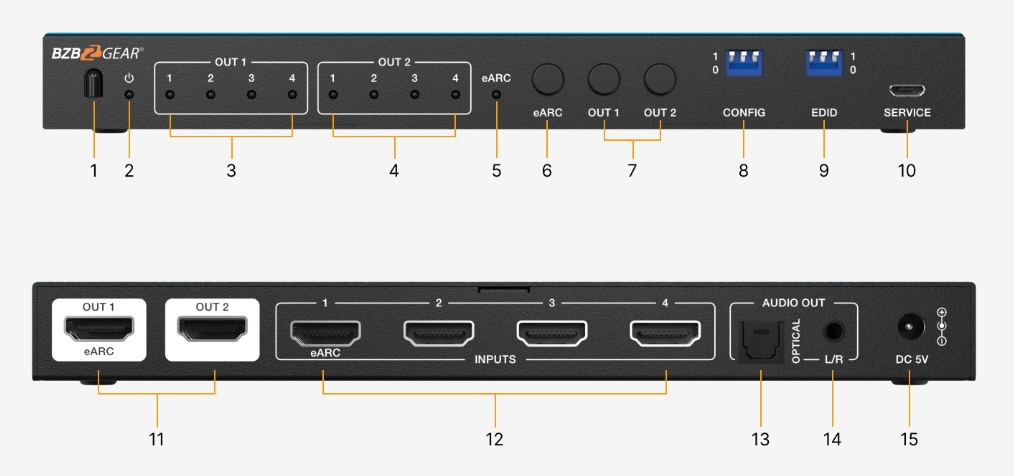
- IR Window: IR input signal receiving window.
- POWER LED: The power LED lights in green when the device is working, and red when the device is in standby.
- OUT 1 LED (1~4): When one of the INPUTS 1/2/3/4 is selected as the signal source for the OUT 1 port, the corresponding green LED 1/2/3/4 will be illuminated.
- OUT 2 LED (1~4): When one of the INPUTS 1/2/3/4 is selected as the signal source for the OUT 2 port, the corresponding green LED 1/2/3/4 will be illuminated.
- eARC LED: The eARC LED will be illuminated when the eARC function is enabled.
- eARC button: Press the button to turn on/off eARC.
- OUT 1~2 button: Used to select the signal source for OUT 1/2 ports. Pressing the button OUT 1/2 will allow the device to switch any of the four HDMI input signals and distribute it to the corresponding output port.
- CONFIG DIP switch: Use the DIP switch to set the working mode.
- EDID DIP switch: Use the DIP switch to set EDID.
- SERVICE: Firmware update and debug port.
- OUT (1~2) port: HDMI signal output ports, connect to an HDMI display device such as a TV or Monitor with an HDMI cable. Note: When the eARC function is turned off, connect the "OUT 1 (eARC) " port to the HDMI display device to work as an output port; When the eARC function is turned on, you can connect the "OUT 1 (eARC) " port to an HDMI TV with eARC function.
- INPUTS (1~4) port: HDMI signal input ports, connect to an HDMI source device such as Blu-ray or PS5 with an HDMI cable. Note: When the eARC function is turned off, connect the "INPUTS 1 (eARC) " port to the HDMI source device to work as an input port; When the eARC function is turned on, connect the "INPUTS 1 (eARC) " port to soundbar to output the audio signal from port "OUT 1 (eARC) " port.
- Optical: Optical fiber audio output port. Note: When the eARC function is turned on, the port is muted.
- L/R: Analog audio output port. Note: When the eARC function is turned on, the port is muted.
- DC 5V: DC 5V/2A Power input port.