

Images SI GCSW-01 Geiger Radiation Graphing and Monitoring Software
Brand:
Images SI
Part #:
GCSW-01
Condition:  Brand New
 $46.55 /Each
$49.95 You save $3.40 7%
There is a $100.00 minimum order required when purchasing "Images SI" products
$46.55 /Each
$49.95 You save $3.40 7%
There is a $100.00 minimum order required when purchasing "Images SI" products
Notification
Item is non-returnable unless defective.
Please review our Return Policy.
Please review our Return Policy.
 Manufacturer warranty
Description
Images SI, GCSW-01, Full Geiger Radiation Graphing and Monitoring Software
GCSW-01 Includes Only:
- Full Geiger Radiation Graphing and Monitoring Software
- USB TTL Cable
Technical details
Main features
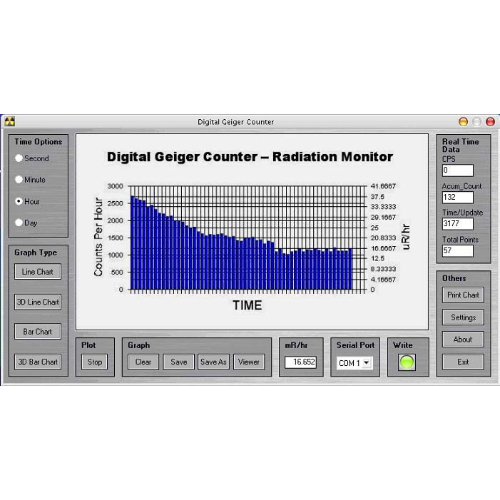
- The Main Graph On which the values will be plotted
- Time Options Frame This allows user to select different time units (Second, Minute, Hour, Day). For example, if you set the time unit to Second, then the program will count the radiation levels perrsecond, and plot. If you set it to Minute, the program will count radiation levels per minute, and plot.
- Graph Type Frame This allows user to switch between different views of graph (Line Chart, 3D Line Chart, Bar Chart and 3D Bar Chart).
- Plot Frame This comprises of the Start button which starts the capturing of data and plotting process. When capturing is in progress, the same button will act as a Stop button, which stops capturing and plotting process
- Graph Frame This comprises of a Clear button which clears the graph, a Save button which saves values to the active file, a Save As button which allows to select a different file for saving, and Viewer button which launches the Viewer.
Reviews.
There are currently no reviews for this product. You can leave the first review and share your experience.