
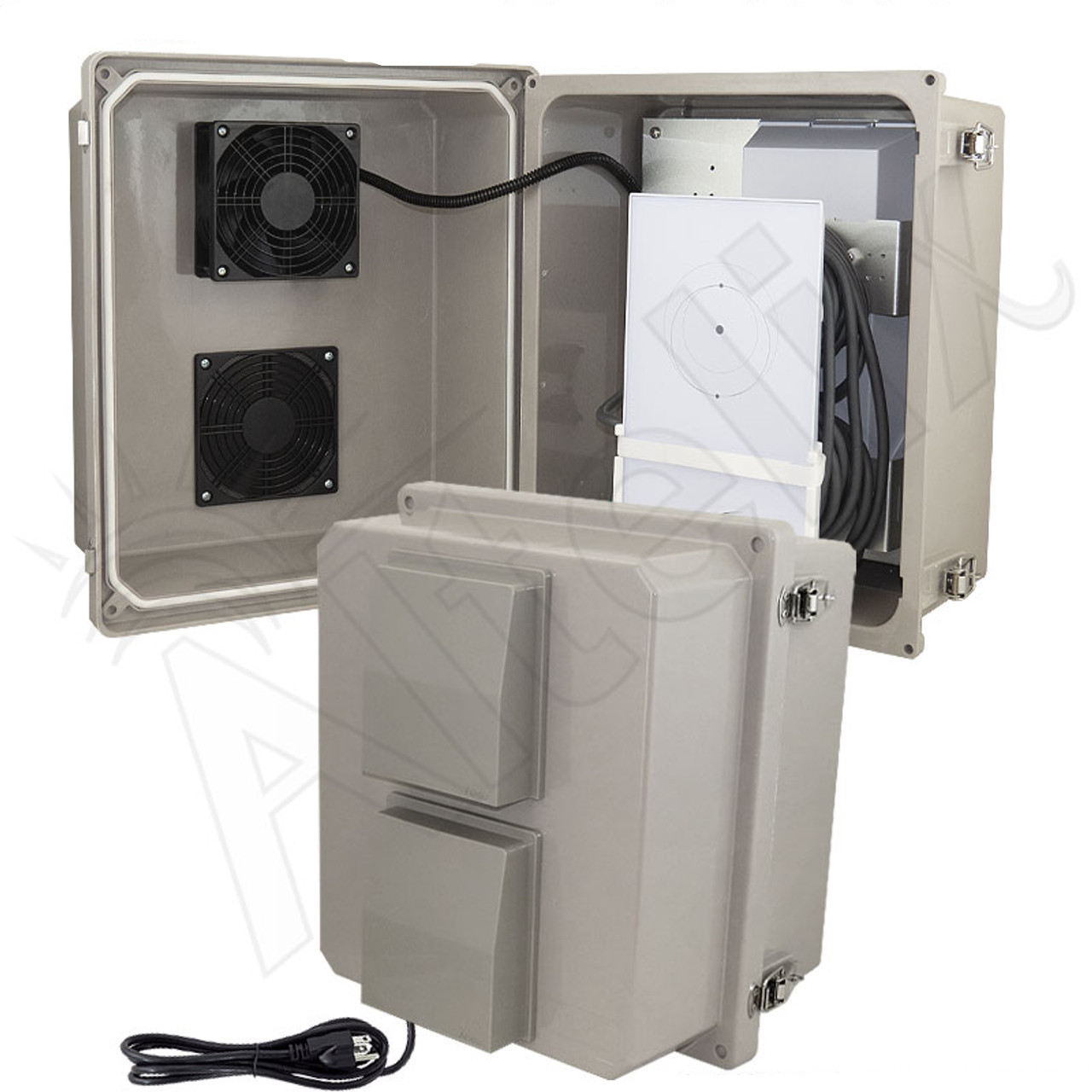

Altelix NF14VFHA1C-STK2-PRO Fiberglass Enclosure for Starlink Pro
 Brand New
Notification
 WARNING: This product can expose you to chemicals including phthalates, which are known to the State of California to cause cancer and birth defects or other reproductive harm. For more information, go to www.P65Warnings.ca.gov
 Manufacturer warranty
Description
Altelix, NF14VFHA1C-STK2-PRO, Fiberglass Weatherproof Enclosure for Starlink Pro Satellite Router & Power Supply (Gen 2) with Heater, Cooling Fan, 120 VAC Outlets & Power Cord
NF14VFHA1C-STK2-PRO Includes Only:
- Enclosure
- Cable glands and stainless steel enclosure mounting feet
Features:
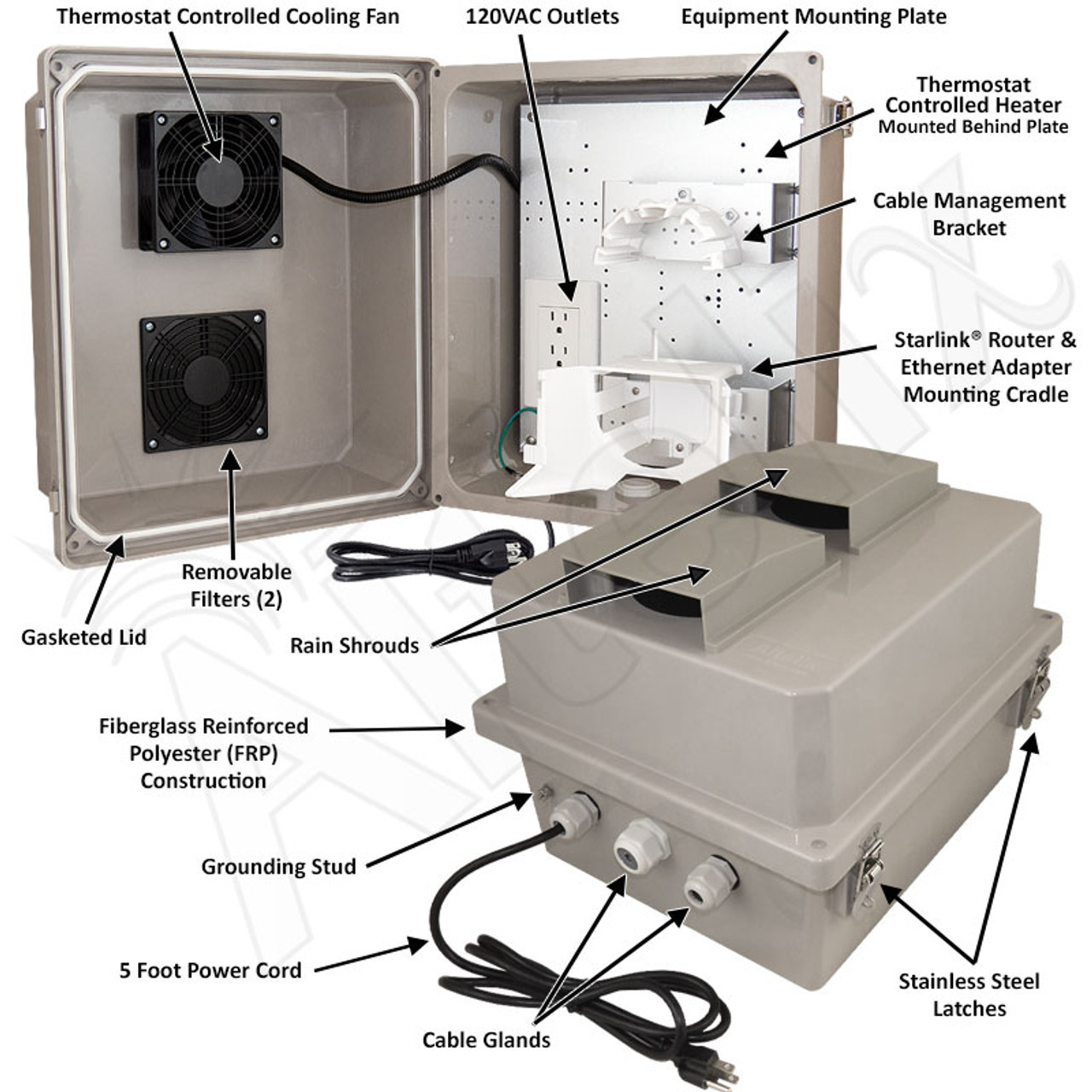
- Install the Starlink® Satellite Router (Gen 2), Starlink® Ethernet Adapter and Starlink® Power Supply (Gen 2) into a Single Enclosure
- Multi Function Cradle Designed to Mount Both the Starlink® Router and Starlink® Ethernet Adapter
- Integral Cable Management for Starlink® Cables
- Equipment Mounting Plate Pre-drilled for Starlink® Power Supply Mounting Bracket
- Plug-and-Play Design, No Electrical Wiring Required
- Thermostat Controlled 200W Heating System
- Thermostat Controlled Cooling Fan with (2) 4" Vents with Rain Shields and Screens
- (2) Pre-wired 120VAC Power Outlets with Pre-wired 5 ft. 3-Prong Power Cord
- Rugged RF transparent fiberglass reinforced polyester FRP construction
- Weatherproof, UV stable and highly corrosion resistant
- Stainless steel hinge and quick release latches with padlock hasps
- NEMA Type 3R, 3RX / IP24 rated
Applications:
- Starlink® Pro / In-Motion System
- Starlink® Satellite Router (Gen 2) -Model #UTR-211
- Starlink® Power Supply -Model #UTP-221
- Starlink® WiFi Mesh Node
- Protection of Starlink® Satellite Internet Router from Theft or Damage
- Concealment of Equipment
- Retail and Commercial Networks
- Rapid Deployment
- Emergency Networks
- Harsh Environments
All Weather Industrial Grade Protection for the Starlink® Pro / In-Motion Satellite System
Designed to provide the ultimate all weather protection for the (Gen 2) Starlink® Pro / In-Motion system, this heated and fan cooled enclosure is ideal for rapid deployment because no wiring is required. Simply mount the enclosure and plug the pre-wired 5 foot power cord into a nearby outlet. The aluminum equipment mounting plate features two pre-wired 120VAC power outlets.
Install the Starlink® Router, Ethernet Adapter and Power Supply into a Single Enclosure
Designed specifically for the (Gen 2) Starlink® Pro / In-Motion system, the Starlink® Router, Ethernet Adapter and Power Supply can all be installed into a single enclosure. This provides the ultimate protection of these sensitive components and simplifies deployment.
Multi Function Mounting Cradle
The Altelix Starlink enclosure features an innovated multi function mounting cradle which is designed to easily mount both the (Gen 2) Starlink® Router and Starlink® Ethernet Adapter into one cradle. This mounting cradle also provides easy to use cable management for all the required cables.
Easy Setup
This enclosure provides easy installation of the Starlink® components, only a screwdriver is needed. First install the mounting bracket for the Starlink® Power Supply to the pre-drilled equipment mounting plate using the supplied hardware. Next install the router cradle which mounts on top of the power supply. Once the Starlink® router and Ethernet adapter are securely mounted inside the enclosure, connect the router's power supply and the antenna's power supply to the internal 120VAC power outlets. Cable glands on the enclosure allow terminated Ethernet cables and the Starlink® antenna cable to be securely connected to the installed equipment. Than simply plug the enclosure's 5 foot power cord into an outdoor outlet and you are up and running. The power cord can be easily removed, and the quick-connect terminal strip simplifies hard-wiring by a qualified installer.
Fan Cooling with Thermostat ControlThis enclosure features two 4' vents and a thermostat controlled cooling fan which helps maintain lower internal temperatures. The fan turns on when the internal temperature reaches 100°F (38°C) and turns off when it drops to 79°F (26°C). Rain shrouds keep rain water from entering the enclosure while allowing ventilation for installed equipment. The fan is wired internally, leaving power outlets available for the Starlink® router and power supply.
Technical details
- Color Gray
- Weight 15.8 lbs. (7.1 kg)
- Material Fiberglass Reinforced Polyester
- Voltage 120VAC
- Outer Dimensions 15.7 x 13.8 x 10.1 Inches (401 x 352 x 258 mm)
- Power Cord Length 5 Feet (1.5m)
- Ratings NEMA Type 3R, 3RX / IP24
- Max Load 10A @ 120VAC
- Mounting Plate Material 0.10 in (2.5 mm) Aluminum
- Mounting Plate Dimensions 10.9 x 12.8 in. (276 x 324 mm)
- Cooling Fan Turn-On Temperature 100°F (38°C) ±6°F
- Cooling Fan Turn-Off Temperature 79°F (26°C) ±9°F
- Flame Rating UL94-5V
- Heater Turn-On Temperature 43°F (6°C) ±5°F
- Heater Turn-Off Temperature 59°F (15°C) ±5°F
- Heater Power 200 Watts
- Terminal Block Wire Range 12-18 AWG
- Terminal Block Wire Strip Length 6-7mm
- Compatible Starlink® Models Starlink® Router (Gen 2) - Model #UTR-211 Starlink® Power Supply - Model #UTP-221
Reviews.
There are currently no reviews for this product. You can leave the first review and share your experience.